User Guide
User Guide Instruction Manual
Updated:
Usage
Supply Status
TopLocked
| Indicator Light | Meaning |
|---|---|
  | Locking element: - powered. Door contact: - is checked - is closed Locking contact: - is checked - is closed |
Unlocked
| Indicator Light | Meaning |
|---|---|
  | Locking element: - unpowered. Door contact: - closed or open. |
Temporarily Unlocked
| Indicator Light | Meaning |
|---|---|
  | Locking element: - unpowered for 20 s. Door contact: - is closed. |
  | Door contact: - is open. |
  | Green arrow as moving light + flashing |
Usage
Handling
TopTemporarily Unlock
| Indicator Light | Meaning |
|---|---|
 | Locked |
 | Key switch briefly to the left |
 | Temporary unlock |
Unlock
| Indicator Light | Meaning |
|---|---|
 | Locked |
 | Key switch held for an extended time to the left |
 | Unlock |
Lock
| Indicator Light | Meaning |
|---|---|
 | Unlocked |
 | Key switch to the right |
 | Locked |
Usage
Alarm States
TopPre-alarm
| Indicator Light | Description |
|---|---|
 | Slow burst of light |
   | Slow impulse tone. If the door does not close after the brief unlock, a pre-alarm is triggered. |
 | Green arrow as moving light. Locking element: - powered. Door contact: - is open. |
Door alarm after pre-alarm
| Indicator Light | Description |
|---|---|
 | Fast burst of light |
   | Fast impulse tone. After the pre-alarm (15 s), the door alarm is triggered. |
 | Green arrow as moving light. Locking element: - powered. Door contact: - is open. |
Direct Release
| Indicator Light | Description |
|---|---|
   | Beep at 5 Hz. The alarm is triggered when the emergency button is pressed. Now the door can be traversed. Locking element: - unpowered |
Emergency Unlock
| Indicator Light | Description |
|---|---|
   | Beep at 1 Hz. Activated by: - adjustable input - via software. Locking element: - unpowered. |
Indirect Release
| Indicator Light | Description |
|---|---|
   | Beep at 2 Hz. Triggered by: - central emergency button - alarm system. Locking element: - unpowered |
Door Intrusion Alarm
| Indicator Light | Description |
|---|---|
   | Beep at 1 Hz. Triggered by: - door intrusion - lack of communication from the door contact. Locking element: - powered |
Lock Alarm
| Indicator Light | Description |
|---|---|
   | Beep at 1 Hz. Triggered by: - failure of the lock to return. Locking element: - powered |
Sabotage Alarm
| Indicator Light | Description |
|---|---|
   | Burst. Triggered by: - interrupted anti-sabotage line. Locking element: - powered |
Usage
Confirm Alarms
TopThis alarm has no instructions for closing the door
Pre-alarm
| Pre-alarm | Description | Locked |
|---|---|---|
 | Slow burst of light |  |
  | Slow impulse tone | |
 | Green arrow as moving light |
This alarm has no instructions for closing the door
Confirm door alarm after pre-alarm
| Door opening alarm | Description | Locked |
|---|---|---|
 | Fast burst of light |  |
  | Fast impulse tone | |
 | Green arrow as moving light |
Direct release confirmation
| Direct release | Door closing | Locked/Unlocked |
|---|---|---|
  | Remove the cover from the emergency button. Turn the emergency button back to its original position. | |
| Beep at 5 Hz. |  | |
| Place the cover on the emergency button. Key switch to the right. | Bloqueado | |
  |  | |
| Key switch to the left. | Desbloqueado | |
  |  |
Confirmation of sabotage alarm / Confirm door intrusion alarm
| Sabotage alarm | Door closing | Locked/Unlocked |
|---|---|---|
  |   |  |
| Ráfaga. | Key switch to the right. Resolve the issue. |
| Intrusion alarm for doors | Door closing | Locked/Unlocked |
|---|---|---|
| Beep at 1 Hz. | Key switch to the right. | Bloqueado |
  | |  |
| Key switch to the left. | Desbloqueado | |
 |  |
Usage
Special Functions
TopLock with Preference
| Indicator Light | Meaning |
|---|---|
  | The installation is locked and does not respond to activation by the local key switch or card reader. |
| Blinking. 3 s on. 1 s off. | Activated by: - airlock control - adjustable input - alarm system. Locking element: - powered. Door contact: - closed. |
Unlock with Priority
| Indicator Light | Meaning |
|---|---|
  | The installation is unlocked and does not respond to the lock command. |
| Blinking. 3 s on. 1 s off. | Activated by: - timer - adjustable input. Locking element: - unpowered. Door contact: - closed. |
Sabotage Alarm Suppression
| Indicator Light | Meaning |
|---|---|
  | The sabotage alarm is not triggered. |
| Key switch held to the left for an extended period | Activated by: - key switch held to the left for > 3 s (unlocked state) - then, key switch again to the left for > 15 s |
  | Until the signal tone sounds. |
| Completion - not used by connecting the cover or closing all sabotage contacts | Locking element: - unpowered. Door contact: - not used. |
Usage
Operating states
Top| State | Description |
|---|---|
| Unlocked | Unpowered locking element. Inactive locking contact. Door contact open or closed. |
| Locked | Locking element powered. Active locking contact. Door contact closed. |
| Short-term unlocking | Locking element unpowered for a specified period of time. Inactive locking contact. Door contact open or closed. |
| Unlocked without priority | Locking element unpowered. Inactive locking contact. Door contact open or closed. Unlocked while the input remains closed, during which locking is possible via the key switch. |
| Unlocked with priority | Locking element unpowered. Inactive locking contact. Door contact open or closed. Unlocked while the input remains closed, during which it is not possible to lock it via a key switch. |
| Locked with priority | Locking element powered. Active locking contact. Door contact closed. No unlocking possible. No short-term unlocking possible. |
| Tamper alarm suppression | Activation: Press the left button for 15 seconds while in the unlocked state (permanent release). Deactivation: Insert the emergency pushbutton cover. |
Usage
Alarm states usage
TopDirect activation
| Category | Description |
|---|---|
| Cause | Local emergency button pressed. |
| Status | Locking element without power. Lock contact inactive. Door contact open or closed. |
| Acknowledgment | Deactivate the local emergency button. Acknowledge the alarm using the key switch. Acknowledgment without resetting the emergency button disconnects the internal buzzer. |
Indirect activation
| Category | Description |
|---|---|
| Cause | Central emergency button pressed. |
| Status | Locking element without power. Lock contact inactive. Door contact either open or closed. |
| Acknowledgment | Deactivate the local emergency button. Confirm the alarm using the key switch. Confirmation without resetting the emergency button disconnects the internal buzzer. |
Emergency unlocking (safety alarm)
| Category | Description |
|---|---|
| Cause | Emergency unlocking via programmed input or software. |
| Status | Locking element de-energized. Lock contact inactive. Door contact open or closed. |
| Acknowledgmente | Cancel the emergency unlocking. |
Tamper alarm
| Category | Description |
|---|---|
| Cause | Tamper contact or tamper input active. |
| Status | Locking element de-energized. Lock contact inactive. Door contact open or closed. |
| Acknowledgment | Eliminate the cause. Confirm the alarm using the key switch. Confirmation without closing the tamper line disconnects the internal buzzer. |
Alarma de intrusión de puerta
| Category | Description |
|---|---|
| Cause | The door or lock contact opens when the door is locked. |
| Status | Locking element energized. Lock contact active or inactive. Door contact open or closed. |
| Acknowledgment | Eliminate the cause (close the door), confirm the alarm using the key switch. Confirmation without closing the tamper line disconnects the internal buzzer. |
Door alarm after pre-alarm
| Category | Description |
|---|---|
| Cause | The lock or door contact is not active after the pre-alarm time has elapsed. |
| Status | Locking element energized. Lock contact active or inactive. Door contact open or closed. |
| Acknowledgment | Eliminate the cause (close the door); the alarm resets automatically. If the cause is not eliminated, acknowledge the alarm using a spring-loaded key switch. |
Pre-alarm
| Category | Description |
|---|---|
| Cause | The lock or door contact is not active after the short-term unlocking period expires or when locking is activated. |
| Status | Locking element energized. Lock contact active or inactive. |
| Acknowledgment | Eliminate the cause (close the door) – the alarm resets automatically. |
Usage
Input functions
Top1: Left-hand closing direction
- 1Temporary unlocking (- 3 sec).
- 1Permanent unlocking (+ 3 sec).
2: Right-hand closing direction
- 2Locking.
- 2Alarm acknowledgment.
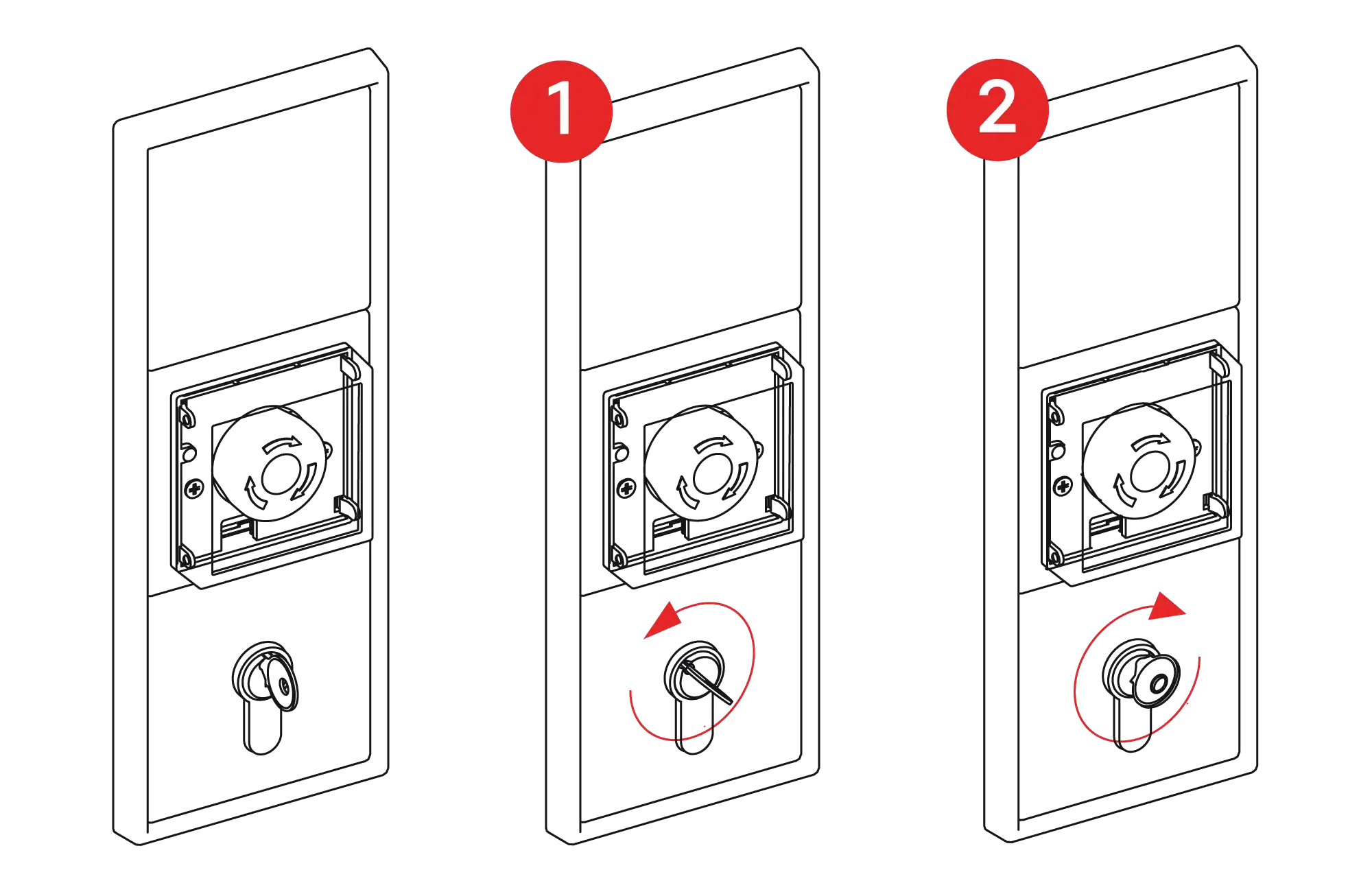
Spring-loaded key switch
Programmable inputs
| Description | Function |
|---|---|
| Locking | Locks the door. |
| Unlocking | Unlocks the door. |
| Short-term unlocking | Timed unlocking. |
| Locking with priority | The door locks when a signal is applied to the input. The door cannot be unlocked afterward. |
| Unlocking without priority | The door unlocks when a signal is applied to the input and locks again if the signal disappears. The door can be locked at any time. (e.g., for operation with a timer switch). |
| Unlocked with priority | The door remains unlocked while the signal is applied to the input. Locking is not possible. |
| Emergency unlocking (safety alarm) | Emergency unlocking, e.g., via the fire alarm system. |
| Tampering | Input for external tamper evaluation. |
| Lock contact | Input for the lock contact of a second element. |
Usage
Output functions
TopThe switching duration of the following alarm signals can be limited using the external acoustic alarm time parameter:
- Collective alarm
- Direct Activation
- Activation
- Indirect activation
- Emergency unlocking (safety alarm)
- Door intrusion alarm
- Door alarm after pre-alarm
- Tampering
Alarm signal time limitation
Output relay parameters
| Description | Function |
|---|---|
| Door status | Door closed status when the output is active. |
| Locked (inactive state) | The output is active when the door is locked. |
| Unlocked | The output is active with all unlocking systems (e.g., to switch the operating mode of a door drive from night to automatic). |
| Door opener pulse | Trigger pulse for the door opener actuator (4-second switching duration). |
| Door opener | Activation of a fail-secure door opener (programmable switching duration). |
| Pre-alarm | Pre-alarm signal. |
| Collective alarm | Collective alarm signal |
| Activation | Activation signal. |
| Direct activation | Direct activation signaling. |
| Indirect activation | Indirect activation signaling. |
| Emergency unlocking (safety alarm) | Emergency unlocking signaling. |
| Door alarm after pre-alarm | Signaling of a door open alarm after a pre-alarm. |
| Door intrusion alarm | Signaling of door intrusion (door or lock contact). |
| Tamper alarm | System tamper signaling. |
| System fault | System fault signaling. |
Usage
Internal signal transmitter
TopThe internal signal transmitter indicates the alarm status through different pulse sequences. It can be configured during the internal alarm period to off, time-limited (internal alarm time), or unlimited (continuous tone).
Usage
Factory settings for inputs/outputs
Top| Setting | Value |
|---|---|
| Pre-alarm period | 15 s |
| External acoustic alarm time | Continuous |
| Internal acoustic alarm time | 3 min. |
| Short-term unlocking | 20 s |
| Trigger pulse for electric strike: | 5 s |
| Multiple passage | Inactive |
| Post-trigger | Active |
Usage
Troubleshooting
Top| Error | Cause | Solution |
|---|---|---|
| The door opening alarm is permanently pending | The door contact is not properly connected | Check the wiring |
| The yellow LED on the ST20 key switch is lit | Bus error | Check the bus wiring |
| The green arrow is lit steadily, the red arrow flashes briefly | Indirect release error | Replace control unit |
Contact Technical Support
Can't find what you're looking for? Our technical support team can help.
Get Help